Long queues and limited banking hours are things of the past. If you need to pay fees for your Computerized National Identity Card (CNIC), Smart ID, or Family Registration Certificate (FRC), you can now do it entirely from your smartphone. The National Database and Registration Authority (NADRA) has integrated with e-Sahulat, allowing citizens to handle payments through popular mobile wallets and banking apps.
This digitization is a huge relief for millions of Pakistanis. Whether you are renewing an expired card, modifying your details, or applying for a new ID, the payment process is often the first hurdle. By using apps like Easypaisa, JazzCash, or your standard banking application, you save time and avoid unnecessary hassle.
In this guide, we will walk you through the exact steps to pay your NADRA fees online using the most popular payment methods in Pakistan.
NADRA e-Sahulat System
Before diving into the “how-to,” it is important to understand the system you are using. NADRA e-Sahulat is an e-commerce platform designed to offer various electronic services to citizens. When you apply for a NADRA document online or visit a center, you are issued a Tracking ID. This Tracking ID is crucial. It connects your application to your payment.
Once you have your Tracking ID, you don’t need to visit a specific NADRA center to pay cash. You simply use that unique number to pay via the 1Link bill payment option available on almost all digital banking platforms in Pakistan.
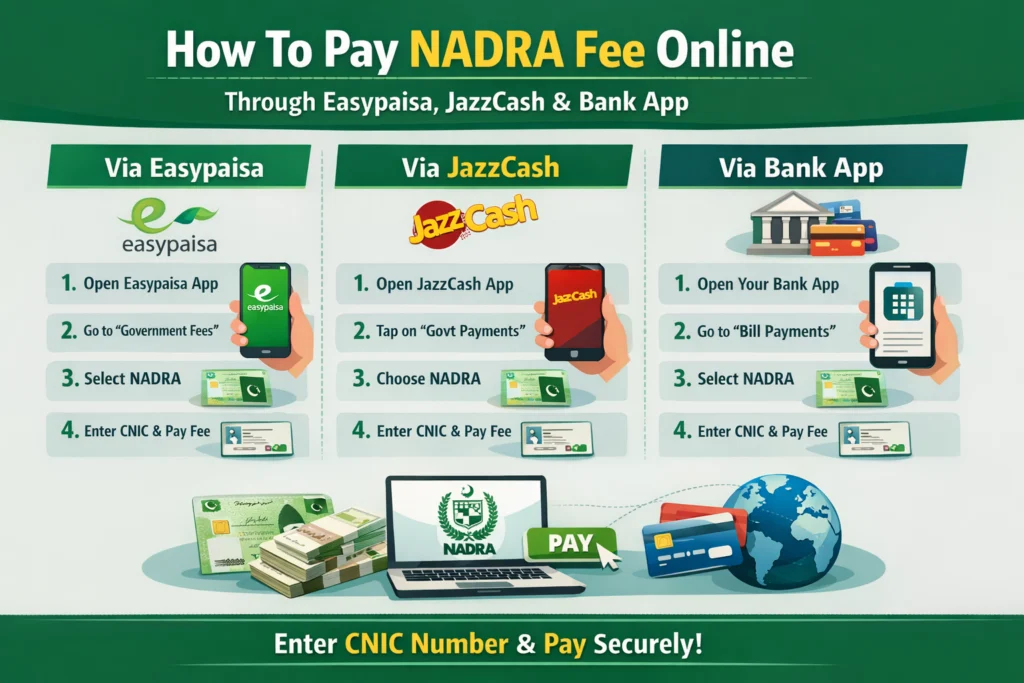
How to Pay NADRA Fee via Easypaisa
Easypaisa is one of the most widely used mobile wallets in the country. Its interface is user-friendly, making bill payments straightforward. Here is the step-by-step process:
Step 1: Open the Easypaisa App
Log in to your Easypaisa application using your PIN or biometric authentication. Ensure you have sufficient balance in your account to cover the NADRA fee.
Step 2: Navigate to Bill Payment
On the home screen, look for the “Bill Payment” icon. If you don’t see it immediately, tap on “More” to view all services.
Step 3: Select ‘Government Fees’
In the bill payment section, you will see various categories like Electricity, Gas, and Internet. Look for and select “Government Fees.”
Step 4: Choose NADRA
Scroll through the list of government departments until you find “NADRA e-Sahulat” or simply “NADRA.”
Step 5: Enter Tracking ID
Enter your Tracking ID when prompted. This is the code generated when you started your application. Enter it carefully and tap “Next.”
Step 6: Verify and Pay
The app will fetch your bill details, showing the amount due and your name (or application reference). Verify these details to ensure you are paying for the right application. Click “Pay Now” to complete the transaction. A digital receipt will be sent to you through the app and via SMS.
How to Pay NADRA Fee via JazzCash
JazzCash is another giant in the Pakistani fintech space, offering a similar level of convenience.
Step 1: Access the JazzCash App
Open your JazzCash app and log in. Check your balance before proceeding.
Step 2: Search for NADRA
On the main dashboard, you can use the search bar at the top. Type “NADRA” into the search bar. Alternatively, scroll down to the “Government Payments” section.
Step 3: Select the Service
Select “NADRA Fee” or “NADRA e-Sahulat” from the options provided.
Step 4: Input Your ID
Enter the Tracking ID provided by NADRA. Double-check the digits to avoid errors.
Step 5: Confirm Payment
JazzCash will display the amount associated with that ID. If the information is correct, enter your MPIN or use Touch ID to authorize the payment. A confirmation message will pop up, and you will get a transaction ID via SMS.
Paying Through Your Bank App (Habib Bank, UBL, Meezan, etc.)
Most scheduled banks in Pakistan are connected to the 1Link system, which facilitates NADRA payments. While the interface varies slightly from bank to bank (HBL, UBL, Meezan Bank, Alfalah, etc.), the core mechanism remains the same.
- Log in: Access your mobile banking app.
- Go to Bill Payments: Find the section for Bill Payments or “Pay Bill.”
- Add New Biller: You usually need to add NADRA as a new biller first.
- Select Category: Choose “Government” or “Government/Authorities.”
- Select NADRA: Find NADRA in the company list.
- Enter Consumer Number: Here, your Consumer Number is your Tracking ID.
- Fetch Bill: The app will retrieve the bill details.
- Pay: Confirm the transaction.
A Note on Gopb App
For residents of Punjab, the e-Pay Punjab app is another valid route for various government taxes, though for federal NADRA fees, the 1Link method via standard banking apps is generally more direct.
Troubleshooting Common Payment Issues
Even with digital systems, glitches happen. Here is what to do if you encounter problems.
“Invalid Consumer Number” Error
This is the most common issue. It usually means the Tracking ID has not yet propagated through the system. If you just generated the ID, wait for 10 to 15 minutes and try again. Also, ensure you are not typing spaces or dashes between the numbers.
Payment Deducted but Status Not Updated
If money has left your account but the NADRA portal says “Unpaid,” do not panic. Banking systems can sometimes take up to 2 hours to sync. Keep your transaction ID (TID) from the SMS receipt safe. If the status doesn’t update after 24 hours, contact your bank’s helpline or NADRA support with the TID.
App Crashes
If your Easypaisa or JazzCash app crashes during payment, check your internet connection first. If the issue persists, try clearing the app cache or restarting your phone.
Why Online Payment is Better
The shift toward digital payments offers three distinct advantages:
- Security: Carrying cash carries risk. Digital transactions provide a secure, traceable trail of payment.
- 24/7 Availability: You don’t need to wait for banking hours. You can pay your fee at midnight or on a Sunday.
- Record Keeping: Your app maintains a history of your transactions, which serves as proof of payment should any bureaucratic disputes arise later.
Final Thoughts on Digital Convenience
Paying your NADRA fee online is a straightforward process that empowers you to manage essential documentation from the comfort of your home. Whether you prefer the accessibility of Easypaisa and JazzCash or the security of your primary bank app, the 1Link infrastructure ensures your payment reaches the authority instantly.
Next time you need to renew an ID or register a family member, skip the bank line. Use your phone, enter your Tracking ID, and get it done in seconds.